
Mouse Too Small for My Hands? What to Do (Fix Discomfort + Improve Control)
If you keep thinking “mouse too small for my hands”, you’re not imagining it. A mouse that’s too short or too cramped can cause finger strain, wrist tension, and unstable control — especially during gaming or long work sessions. In this guide, you’ll learn how to confirm the problem, why it happens, and the fastest way to fix a mouse too small for my hands situation without guessing.
Quick Fit Check
- Front overhang: your fingers extend past the buttons or feel “jammed” at the front.
- No rear support: your palm can’t rest, so the mouse feels unstable.
- Grip tension: you squeeze harder just to keep control.
- Tracking feels shaky: micro-adjustments feel inconsistent or twitchy.
- Fast fatigue: your hand gets tired quickly even in short sessions.
If you recognize 2+ of these, your mouse too small for my hands issue is very likely real (or the shape is wrong for your grip).
Still unsure which mouse size actually fits your hand?
Use Mouse Finder to get a fit-based shortlist (hand size + grip + primary use)
Answer a few quick questions and we’ll narrow it down to the best matches — no endless scrolling, no guessing. If you’re stuck with a mouse too small for my hands feeling, this is the fastest fix.
Takes ~30 seconds. Built around fit, not hype.
Signs Your Mouse Is Too Small for Your Hands
The mouse too small for my hands problem usually starts with subtle signals — then becomes obvious over time. If your mouse feels tiny, short, cramped, or “hard to relax on,” check these signs:
- Your fingertips hang over the front and you can’t rest naturally on the buttons.
- Your palm has little or no contact with the rear hump, so you lose support.
- You re-grip constantly to feel stable during tracking or flicks.
- Your fingers feel curled in a forced position (especially with palm or relaxed claw).
- You get pain or fatigue fast in the wrist, fingers, or forearm.
If the mouse feels stable only when you squeeze harder, that’s a classic mouse too small for my hands pattern.
Why a Mouse That’s Too Small Becomes a Problem
When a mouse is too short or too low for your hand, your body compensates. You end up using more finger pressure and more wrist control than you should, which increases tension and reduces consistency. That’s why a mouse too small for my hands often feels “fast” at first — but worse over long sessions.
Common problems when your mouse is too small for your hands:
- Increased finger strain (especially index + middle finger)
- Wrist tension from awkward angles
- More fatigue and less stable tracking
- Inconsistent aim from over-gripping
- Higher risk of long-term discomfort in long sessions
A key ergonomic theme is keeping the wrist closer to neutral and avoiding unnecessary grip force — a mouse that fits helps with both.
External reference: OSHA pointer/mouse guidance
Why So Many People End Up With a Mouse That’s Too Small
A mouse too small for my hands issue is extremely common — mostly because mouse shopping pushes the wrong priorities.
- Popular gaming mice are often shaped around small/medium hands.
- Lightweight trends sometimes shrink size instead of improving fit.
- Most people never measure hand size before buying.
- Marketing focuses on sensors and grams — not length and support.
Result: people adapt to a mouse too small for their hands instead of choosing a better fit.
What to Do If Your Mouse Is Too Small for Your Hands
1) Measure your hand size (start here)
The fastest way to solve a mouse too small for my hands problem is to measure hand length (wrist crease to tip of middle finger). This instantly tells you whether compact mice are likely to feel cramped.
Quick guideline:
- If your hand length is around 19 cm (7.5 in) or more, many compact mice will feel too small.
- If you’re in the middle, grip style often decides whether you need more rear support.
Even “medium” hands can feel a mouse is too small if the hump sits too far forward or the shape is too low.
2) Choose size first — not just weight
A common mistake is buying the lightest mouse available. A lightweight mouse that’s too small for your hands often feels unstable because you compensate with a tighter grip. A slightly heavier mouse that fits can feel more controlled, more comfortable, and more consistent.
3) Match the mouse to your grip style
Grip style changes what “too small” means. If you’re searching mouse too small for my hands, use this as a quick fit guide:
Palm grip
- Needs full hand contact
- Benefits from more length + rear support
- Small mice often create tension over time
Palm: Full hand contact.
Claw grip
- Needs a supportive rear hump
- Too small = unstable and forced curl
- Too big = harder micro-adjustments
Claw: Arched fingers.
Fingertip grip
- Can go smaller, but still needs stability
- Ultra-short can feel twitchy for tracking
- Often prefers light + balanced shapes
Fingertip: Only fingertips touch.
Office vs Gaming
- Office: comfort + neutral wrist matters most
- Gaming: stability + consistent control matters
- Both: wrong size increases grip force
The best fix is still the same: choose a mouse that fits your hand and grip.
4) Don’t “adapt” to the wrong size
When your mouse is too small, people adapt by squeezing harder, changing wrist angles, or re-gripping constantly. That’s not skill — it’s compensation. If your thought is mouse too small for my hands, the real solution is fit.
- More grip pressure
- More wrist tension
- Less consistency
- More fatigue
Fastest Fix: Use Mouse Finder (Avoid Buying Wrong Again)
If you’re stuck in a loop of “mouse too small for my hands” purchases, guessing usually repeats the same mistake. The fastest shortcut is a fit-based filter.
Mouse Finder helps you:
- Enter your hand size
- Select your grip style
- Choose primary use (office or gaming)
- Get a shortlist of mice that actually fit
Try it here: Mouse Finder
Gaming Performance: How a Too-Small Mouse Hurts Aim
A mouse too small for my hands often increases grip tension, which hurts long-term consistency. The right size improves stability and reduces overcorrection.
- Better fit = calmer micro-adjustments
- Less tension = fewer shaky corrections
- More rear support = more stable tracking
If you play FPS with low sensitivity and do a lot of tracking, a too-small mouse is one of the most common hidden causes of inconsistency.
Best Mouse Picks If Your Mouse Feels Too Small
If your current mouse feels cramped, these are safe picks that typically solve a mouse too small for my hands issue by adding length, rear support, or both.
Razer DeathAdder V4 Pro
Best overall fix for “mouse too small for my hands”
A classic upgrade for bigger hands: more rear support and a shape that lets your hand relax. If your current mouse feels too short, this usually fixes the problem immediately.

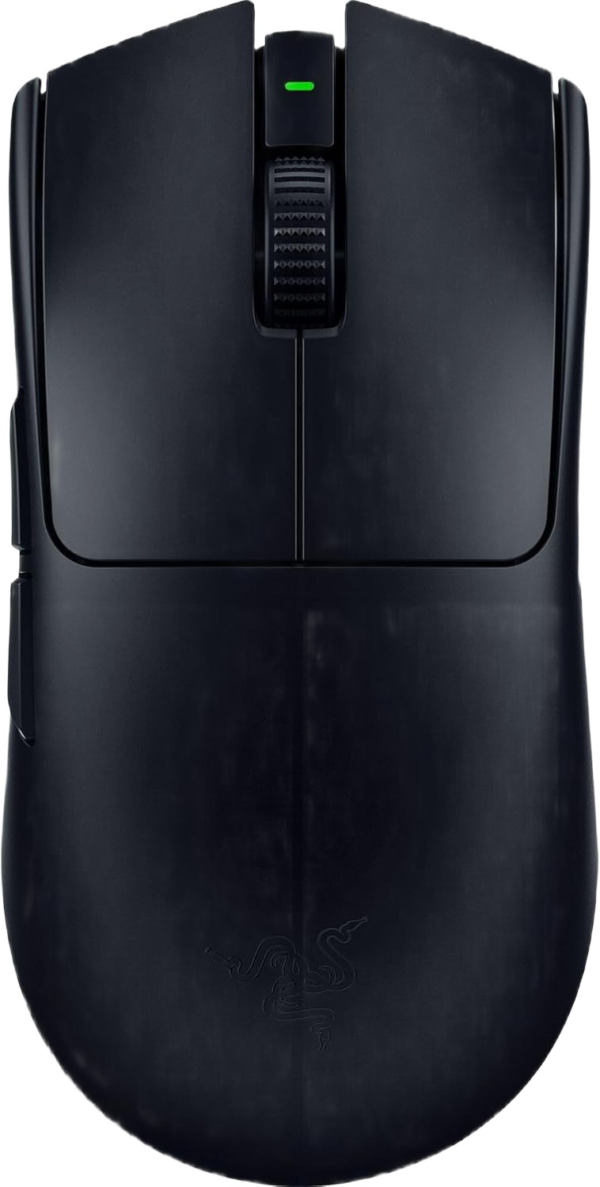
Razer Viper V3 Pro
Best stable FPS feel (without “tiny mouse” vibes)
If your compact mouse feels twitchy or unstable for tracking, this gives you a more stable in-hand feel while staying fast. Great if you’re solving a mouse too small for my hands issue but still want a competition shape.
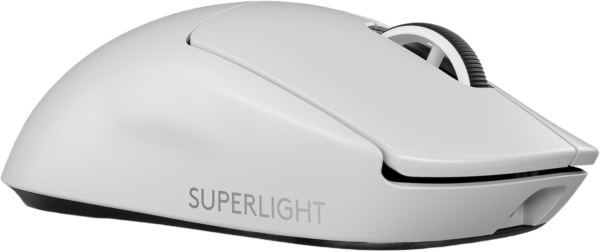
Logitech G PRO X Superlight 2
Safest all-round pick if you’re unsure
A reliable “safe shape” that often fixes the too-small feeling by improving balance and usable length. Great if you don’t want a dramatic ergonomic change.
Roccat Kone Pro
Best value “full in hand” feel
Supportive and comfortable. If the problem is “my mouse feels too small for my hands,” this kind of fuller shape can reduce grip tension and improve long-session comfort.

If you want to solve a mouse too small for my hands issue with the least effort, Mouse Finder is the fastest shortlist.
Large vs Small Mouse: The Simple Rule
Choose a larger / longer mouse if:
- You keep thinking mouse too small for my hands
- Your palm has no stable contact
- You grip harder to control the mouse
- Tracking feels unstable
- You play/work for long sessions
A smaller mouse can still work if:
- You have small/medium hands
- You use pure fingertip grip
- You play at high sensitivity
- You feel stable without over-gripping
For the deeper breakdown, see: Large vs Small Gaming Mouse.
If You Have Hand or Wrist Pain
A mouse too small for your hands can increase finger strain and wrist tension. If discomfort shows up during or after use, treat it as a signal — not something to push through.
Rule: pain and numbness are not “normal.” If symptoms persist, consider adjusting fit and workstation setup.
External reference: Mayo Clinic wrist pain causes
FAQ – Mouse Too Small for My Hands
Can a mouse be too small for your hands?
Yes. If you’re thinking mouse too small for my hands, common signs include fingers extending past the front, no palm support, and needing to grip harder to stay in control. That often leads to discomfort and inconsistent precision.
What are the clearest signs a mouse is too small?
The clearest signs are finger overhang, loss of rear support, frequent re-gripping, and increased grip pressure. If you feel “cramped” or tense, it’s often a mouse too small for my hands issue.
What hand size usually needs a larger mouse?
As a quick rule, if your hand length is around 19 cm (7.5 inches) or more, many compact mice will feel too small. Grip style matters too — palm grip usually needs more length and rear support.
Is a lightweight mouse bad for large hands?
Not necessarily. Lightweight is great, but fit matters more than weight. A lightweight mouse too small for your hands can feel unstable because you compensate with more grip force.
Can a small mouse cause hand or wrist pain?
It can. A too-small mouse may increase finger strain and wrist tension, especially during long sessions. If you feel pain, it’s worth treating the cause (fit + setup) instead of pushing through.
Should I adapt to a mouse that feels too small?
Usually no. “Adapting” often means over-gripping, changing wrist angles, and re-gripping constantly. If your thought is mouse too small for my hands, switching to a better fit is the cleanest solution.
What’s the fastest way to find the right mouse size?
Measure hand length and match it to a mouse designed for your grip style. The fastest shortcut is Mouse Finder, which builds a fit-based shortlist so you avoid another mouse too small for my hands purchase.
Final Thoughts
If your mouse feels too small, the fix isn’t better technique — it’s better sizing. A mouse that fits properly reduces tension, improves stability, and helps you stay consistent. If you keep searching mouse too small for my hands, your next step should be a fit-based shortlist.
Use Mouse Finder to get recommendations based on your hand size + grip style. It’s the fastest way to avoid buying another mouse that’s too small for your hands.
