
Best Low Profile Keyboard for Small Hands 2026: 6 Picks for Easier Typing
The best low profile keyboard for small hands should make typing feel lighter, closer, and easier to control. A good low-profile board reduces key height, shortens reach, and helps your mouse sit closer to your natural shoulder position.
This guide focuses on low-profile keyboards that actually make sense for smaller hands: compact 75%, 65%, and 60% layouts, quiet office boards, gaming picks, and portable keyboards that do not force unnecessary finger stretch.

The Fast Answer
For most people, the best low profile keyboard for small hands is the NuPhy Air75 V2. It gives you the safest balance: low-profile typing, compact 75% layout, wireless support, arrow keys, function keys, and enough comfort for work and gaming.
Choose the Keychron K3 Max if you want a customizable low-profile mechanical keyboard. Choose the NuPhy Air60 V2 if you want the smallest portable setup. Choose the ASUS ROG Falchion RX Low Profile if gaming is the priority. Choose the Keychron B1 Pro or Logitech Pebble Keys 2 K380s if you want quiet office value.
Want the safest keyboard for your hands and setup?
Keyboard Finder helps you compare layout, switch feel, noise level, connection, use case, and budget. It is the fastest way to narrow down the best low profile keyboard for small hands without guessing from product photos.
Get my keyboard match → Takes about 30 seconds · No signup
Best Low Profile Keyboard for Small Hands – 2026 Picks
These picks are chosen for reach, typing height, layout practicality, comfort, and real use case. The best low profile keyboard for small hands should feel easier on day one, not only look compact on a desk.
NuPhy Air75 V2
Low-profile 75% keyboard with the safest balance for small hands
Verdict: The best low profile keyboard for small hands for most people because it keeps daily keys while reducing typing height and desk width.
- Best for: work, gaming, coding, travel setups, and mixed daily use.
- Why it fits: 75% keeps arrows and F-keys, while the low-profile design reduces finger lift.
- Skip if: you want a full-size numpad or a tall traditional mechanical feel.

Keychron K3 Max
Ultra-slim 75% mechanical keyboard with QMK/VIA and hot-swap support
Verdict: The best low profile keyboard for small hands if you want customization, mechanical feel, and a compact layout that still feels practical.
- Best for: users who want a customizable low-profile mechanical keyboard for work and gaming.
- Why it fits: 75% keeps useful keys but removes full-size width, making the mouse easier to reach.
- Skip if: you want a cheaper office-only keyboard or a 60% ultra-compact board.

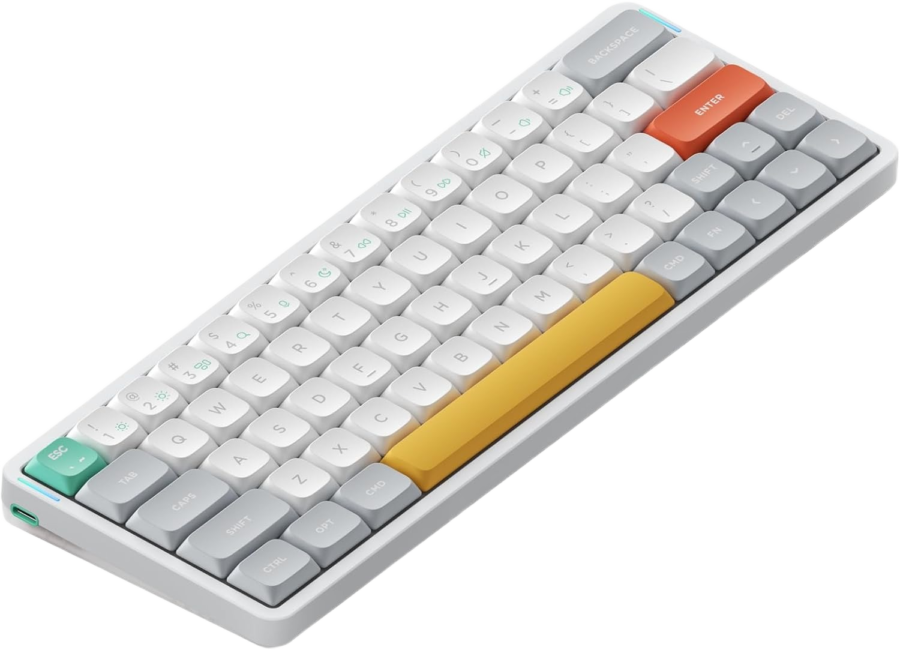
NuPhy Air60 V2
60% low-profile wireless keyboard for the shortest reach and cleanest setup
Verdict: The best low profile keyboard for small hands if you want the smallest practical low-profile board and are comfortable using layers.
- Best for: tiny desks, travel, minimalist setups, and users who want maximum mouse space.
- Why it fits: the 60% width shortens side reach, while low-profile keys keep typing light.
- Skip if: you need dedicated arrow keys, function keys, or navigation keys every day.
ASUS ROG Falchion RX Low Profile
65% low-profile wireless gaming keyboard with compact reach and optical switches
Verdict: The best low profile keyboard for small hands if gaming is the priority and you want compact width without losing arrow keys.
- Best for: gaming, FPS setups, small desks, and players who want more mouse room.
- Why it fits: 65% gives real arrows and less width, while low-profile switches keep movement light.
- Skip if: you want the cheapest option or a quiet office-first keyboard.

Keychron B1 Pro
Ultra-slim 75% office keyboard with quiet scissor switches and long battery life
Verdict: The best low profile keyboard for small hands if you want a cheap, quiet, ultra-slim board for work, study, and laptop-style typing.
- Best for: office work, school, emails, writing, and shared spaces.
- Why it fits: slim key height and compact 75% width reduce reach without making daily typing difficult.
- Skip if: you want a mechanical switch feel or RGB gaming features.

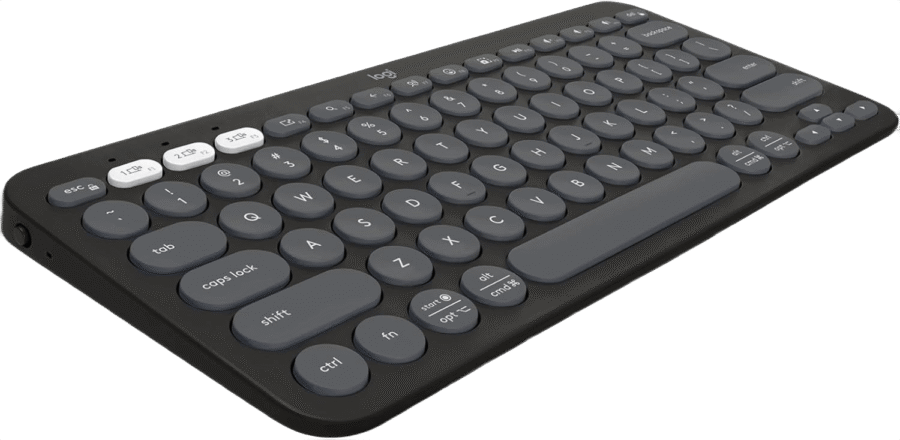
Logitech Pebble Keys 2 K380s
Compact Bluetooth keyboard for quiet, portable, low-effort typing
Verdict: The best low profile keyboard for small hands if you want a simple, portable, inexpensive keyboard for everyday typing.
- Best for: students, laptop users, travel, quiet typing, and basic office work.
- Why it fits: compact width, slim scissor keys, and quiet typing make it easy for smaller hands.
- Skip if: you want a true mechanical keyboard or a serious gaming board.
Still choosing between 75%, 65%, and 60%?
Smaller is not always better. Use Keyboard Finder to match layout, typing feel, desk space, noise, and budget before buying.
Find my best keyboard → Better than guessing from size alone
Low-Profile Keyboard Comparison for Small Hands
The best low profile keyboard for small hands depends on how many dedicated keys you need. Use this table before choosing a layout.
| Keyboard | Best for | Size | Small-hand benefit | Watch out for |
|---|---|---|---|---|
| NuPhy Air75 V2 | Best overall | 75% | Low height, compact width, keeps key access | No numpad |
| Keychron K3 Max | Mechanical customization | 75% | Ultra-slim mechanical feel with QMK/VIA | Still wider than 65% |
| NuPhy Air60 V2 | Ultra-compact travel | 60% | Shortest reach and most mouse space | Uses layers for arrows and F-keys |
| ASUS ROG Falchion RX Low Profile | Compact gaming | 65% | Gaming speed with real arrows | Higher price |
| Keychron B1 Pro | Budget office | 75% | Ultra-slim, quiet, easy daily typing | Not mechanical |
| Logitech Pebble Keys 2 K380s | Cheap portable typing | Compact | Light, quiet, small, laptop-like feel | Basic feature set |
Why Low-Profile Keyboards Help Small Hands
Low-profile keyboards can be easier for smaller hands because the keys sit lower. That usually means less finger lift, a flatter wrist angle, and less effort moving between rows. The best low profile keyboard for small hands also reduces side reach by using a compact layout.
Less vertical movement
Lower key height can make typing feel lighter, especially if tall mechanical keyboards make your fingers or wrists tired.
Shorter side reach
Compact 75%, 65%, and 60% layouts bring the mouse closer and reduce the distance your hands travel across the desk.
Better laptop transition
If you are used to laptop keys, low-profile keyboards often feel more natural than tall mechanical keyboards.
Cleaner desk posture
A narrower keyboard can help keep your hands closer to shoulder width during long sessions.
How to Choose the Best Low Profile Keyboard for Small Hands
Start with layout. A 75% keyboard is the safest choice for most people because it keeps arrows and function keys. A 65% keyboard is better if you want more mouse space but still need arrows. A 60% keyboard is only ideal if you are comfortable using layers.
Choose 75% if you want the safe pick
- Keeps the function row and arrow keys.
- Much smaller than full-size.
- Best balance for typing, work, coding, and casual gaming.
Choose 65% if you game more
- More mouse space than 75%.
- Keeps arrow keys.
- Good for FPS, compact desks, and focused setups.
Choose 60% only if you like shortcuts
- Smallest common layout.
- Best for travel and minimal setups.
- Can be annoying if you need arrows or F-keys often.
Choose scissor switches for quiet work
- Usually flatter and quieter.
- Good for office, school, and shared rooms.
- Less mechanical feel, but very easy to type on.
Low-profile mechanical vs scissor switches
Low-profile mechanical keyboards feel more premium and are better for customization. Scissor-switch keyboards are usually quieter, slimmer, and cheaper. The best low profile keyboard for small hands can be either one; the right choice depends on whether you value mechanical feel or quiet simplicity more.
Do not buy full-size unless you need the numpad
Full-size low-profile keyboards can be comfortable, but they are still wide. For small hands, that width often matters because it pushes your mouse farther away. Unless number entry is part of your daily work, 75%, 65%, or compact layouts usually make more sense.
Common Mistakes to Avoid
- Buying 60% too early: tiny boards look great, but losing arrows and F-keys can slow you down.
- Ignoring key height: a compact keyboard can still feel tiring if it is tall and steep.
- Choosing full-size by habit: the numpad is useful only if you actually use it every day.
- Forgetting the mouse: wide keyboards push the mouse farther away, which can hurt comfort and aim.
- Only looking at aesthetics: the best low profile keyboard for small hands should feel easier, not just look clean.
FAQ – Best Low Profile Keyboard for Small Hands
Quick answers before choosing the best low profile keyboard for small hands for your setup.
What is the best low profile keyboard for small hands overall?
The NuPhy Air75 V2 is the best overall pick here because it has a compact 75% layout, low-profile mechanical keys, wireless support, and enough daily keys for work, gaming, and coding.
Are low-profile keyboards better for small hands?
Often, yes. Low-profile keyboards reduce key height and finger lift, which can make typing feel lighter and easier for smaller hands. They are especially useful if tall mechanical keyboards feel tiring.
Is 75% or 65% better for small hands?
75% is safer for most people because it keeps the function row and arrow keys. 65% is better if you want more mouse space while still keeping arrows.
Should small hands use a 60% keyboard?
A 60% keyboard can work very well for small hands, but only if you are comfortable using layers for arrows, F-keys, and navigation. If you want fewer compromises, choose 75% or 65%.
What is the best low-profile gaming keyboard for small hands?
The ASUS ROG Falchion RX Low Profile is the best gaming pick here because it uses a compact 65% layout, low-profile switches, wireless support, and a small-hand-friendly footprint.
What is the best cheap low-profile keyboard for small hands?
The Keychron B1 Pro is the best budget office pick if you want a slim 75% layout. The Logitech Pebble Keys 2 K380s is the cheaper portable option for quiet everyday typing.
Bottom Line
The best low profile keyboard for small hands is the keyboard that lowers typing height, reduces reach, and still keeps your daily keys easy to access. Choose the NuPhy Air75 V2 for the best overall balance, the Keychron K3 Max for customizable mechanical feel, the NuPhy Air60 V2 for the smallest setup, the ASUS ROG Falchion RX Low Profile for gaming, the Keychron B1 Pro for budget office work, or the Logitech Pebble Keys 2 K380s for cheap portable typing.
Do not choose by size alone. The best fit depends on layout, key height, noise, switch feel, and whether you need arrows or function keys. Use Keyboard Finder to get a faster shortlist.
Affiliate disclosure: As an Amazon Associate, Gripyx earns from qualifying purchases.
