
How Mouse Finder Works
Learn how Mouse Finder works by combining hand size, grip style, primary use and personal preferences with structured mouse data. The goal is not to push the most popular product. It is to reduce poor-fit options and rank the mice that make the most sense for you.
The method in 3 steps
- You describe your fit: hand size, grip style, use case and preferences.
- Mouse Finder evaluates the database: products are compared with the combination of your answers.
- The strongest matches rise: your Best Match is the highest-ranked fit for that profile.
Want to see how Mouse Finder works in practice?
Answer a short set of questions and Mouse Finder will narrow the database to mice that better match your hand, grip and intended use.
Find your mouse Takes about 30 seconds
Why Mouse Finder Exists
Buying a mouse is often treated like a specification contest. Sensor performance, polling rate, weight and popularity are easy to compare, but they do not answer one of the most important questions: does the mouse actually make sense for your hand?
Two people can use the same mouse and have completely different experiences. A compact shape may feel natural for a smaller fingertip-grip user while feeling cramped for someone with a larger hand using palm grip.
Understanding how Mouse Finder works starts with this difference. The tool begins with physical fit, grip style and intended use instead of beginning with the most famous product or the longest specification sheet.
The core principle: the most popular mouse is not automatically the best mouse for you.
How Mouse Finder Works Step by Step
This step-by-step view explains how Mouse Finder works from your first answer to the final ranked shortlist.
1. Primary use
Mouse Finder first establishes whether your main use is office work or gaming. This changes which product characteristics are most relevant.
2. Grip style
Palm, claw and fingertip grips interact differently with shell size, hump position, support and overall shape.
3. Hand size
Hand length helps establish which mouse dimensions are more likely to feel appropriate and which models are obvious size mismatches.
4. Gaming context
Gaming users can refine the recommendation by game type, including FPS, MMO, MOBA and general gaming.
5. Preferences
Connection, weight, budget and brand preferences help refine the shortlist once the core fit has been established.
6. Ranked results
Compatible products are evaluated together and ranked so the strongest overall fit appears as your Best Match.
Hand Size Is the Physical Starting Point
A mouse cannot be evaluated only from its specifications. Its length, width, height and overall volume interact with the size of the hand using it.
Hand length is an important part of how Mouse Finder works because it provides a simple and repeatable signal for eliminating obviously unsuitable size ranges. It is not used as a standalone answer to the entire fit question.
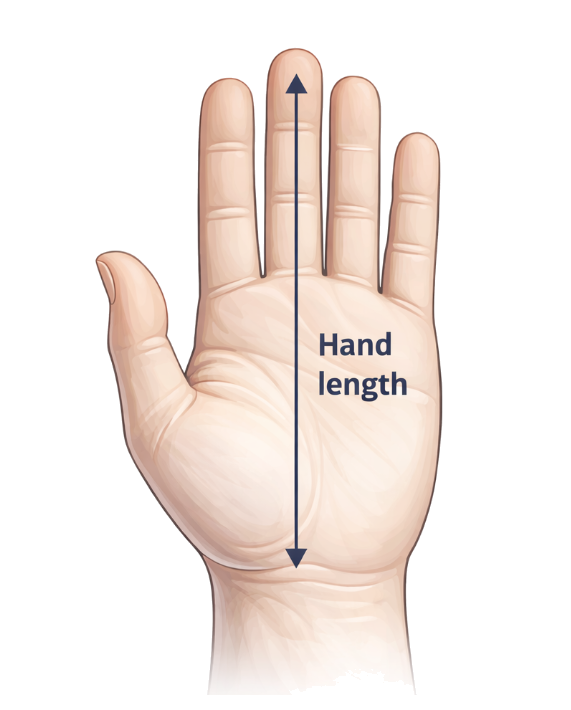
A 19 cm palm-grip user and a 19 cm fingertip-grip user may reasonably prefer very different shapes, which is why hand size is always interpreted together with grip style.
For a broader sizing reference, see the Gripyx Mouse Size Chart.
The Signals Used to Build Your Recommendation
The signal mix is central to how Mouse Finder works: fit-related inputs establish relevance first, while secondary preferences refine the final result.
Hand length
Helps determine which overall mouse dimensions are likely to be sensible for your hand.
Grip style
Palm, claw and fingertip gripping create different requirements for support, mobility and shell shape.
Primary use
Office work and gaming can require different balances between comfort, movement and control.
Game type
FPS, MMO, MOBA and general gaming can favor different product characteristics and layouts.
Connection & weight
Wired or wireless preferences and preferred weight narrow the results without replacing the fit calculation.
Budget & brand
Commercial preferences help refine the shortlist after Mouse Finder understands what kind of mouse is relevant.
How Mouse Finder Ranks the Results
Ranking is another important part of how Mouse Finder works. The tool does not maintain one universal list of the “best mice.” The order changes according to the answers supplied by each user.
Fit-related signals such as hand size, grip style and intended use are evaluated together with additional preferences. A product that is an excellent fit for one profile may rank much lower for another.
What can strengthen a match
- Suitable dimensions for your hand
- Good compatibility with your grip style
- Strong alignment with your primary use
- Matching connection and weight preferences
- Matching your selected budget or brand
What does not automatically win
- The highest price
- The most famous brand
- The newest product
- The highest advertised DPI
- The product with the most marketing hype
Context matters: Mouse Finder scores products for your profile, not against a permanent universal leaderboard.
What “Best Match” Actually Means
To understand how Mouse Finder works, it is important to interpret Best Match correctly. Best Match does not mean “the best mouse in the world.” It means the highest-ranked product in the current Gripyx database for the combination of answers you provided.
Other recommendations remain visible because fit is rarely binary. Several mice may make sense for the same user while differing in shape, weight, price or secondary features.
Best Match is a shortlist starting point, not a guarantee.
Human hands, grip pressure and personal preferences vary too much for any recommendation system to promise a perfect physical fit.
If two recommended mice look similar on paper, the Gripyx 3D Mouse Shape Compare can help reveal differences that basic dimensions do not show clearly.
What Happens When There Is No Exact Match?
Closest-match behavior is part of how Mouse Finder works when the database does not contain a product that satisfies every selected preference at once.
In those situations Mouse Finder can surface the closest relevant alternatives rather than returning an empty result.
For example, a mouse may strongly match your hand size, grip style and gaming needs while sitting outside your selected price range. Preserving that strong fit can be more useful than recommending an inferior shape purely because it matches the budget checkbox.
Fit first: when an exact match is unavailable, Mouse Finder prioritizes keeping the recommendation relevant rather than pretending a perfect match exists.
Where the Mouse Data Comes From
Product data is the foundation of how Mouse Finder works. Recommendation quality depends on the completeness and consistency of those underlying fields.
Gripyx maintains a structured mouse database containing attributes used by Mouse Finder, including physical dimensions, weight, connection type, intended use, grip compatibility and other product characteristics.
Product specifications are collected from manufacturer information and other reliable product sources, then normalized so mice from different brands can be compared using the same types of fields.
The database is intentionally curated rather than designed to contain every mouse ever released. Complete and useful fit data is more valuable to the matching system than a huge catalogue filled with incomplete entries.
Physical dimensions
Length, width and height describe the physical footprint and general proportions of the mouse.
Fit attributes
Grip compatibility, hand-size ranges and use-case information help turn raw dimensions into useful fit signals.
Product attributes
Weight, connectivity, brand and pricing information help refine recommendations after the underlying fit is understood.
Shape Matters Beyond Length, Width and Height
Shape is one of the reasons how Mouse Finder works cannot be reduced to a simple size table. Two mice can have nearly identical dimensions and still feel very different in the hand.
Hump position, side curvature, button height, rear flare and how quickly the shell narrows all influence how the mouse sits in the hand.
That is why Mouse Finder should be treated as a decision-support tool rather than a replacement for physical feel. Measurements help narrow the field; shape determines many of the finer differences.
Supported models can be inspected from multiple angles using 3D Mouse Shape Compare.
Why Fit Is Worth Considering
The reasoning behind how Mouse Finder works is practical rather than medical: mouse comfort is influenced by the physical interaction between the device, the hand and the way the device is held.
For broader context outside Gripyx, RTINGS explains how it evaluates mouse ergonomics and grip suitability, while ergonomic research indexed through the U.S. National Library of Medicine discusses mouse design and upper-extremity posture.
Mouse Finder does not turn that research into a medical claim. The goal is simpler: use measurable fit information to reduce obviously unsuitable buying options.
How User Feedback Helps Improve Mouse Finder
Feedback adds a real-world check to how Mouse Finder works. A recommendation system should not be evaluated only against its own scoring rules.
Mouse Finder includes fit feedback so users can indicate whether a recommendation worked for them or did not fit as expected.
Those signals can help Gripyx identify patterns over time: where recommendations perform well, where particular profiles deserve closer inspection and where product fit data or matching logic may need adjustment.
Feedback is used as a diagnostic signal. A single vote does not automatically rewrite rankings or prove that one mouse will fit every user with a similar profile.
The long-term objective: combine structured product data with real-world feedback so the recommendation system can improve as more evidence is collected.
Affiliate Links Do Not Determine the Ranking
Recommendation independence is essential to how Mouse Finder works. Gripyx is supported partly through affiliate partnerships, but affiliate commission does not determine Best Match.
If you follow a retailer link and make a qualifying purchase, Gripyx may receive a commission at no additional cost to you. Mouse Finder is designed to rank products using your answers and product-fit data, not according to which mouse generates the highest commission.
Availability and current retailer pricing may affect which buying options are shown, but that is separate from the underlying fit recommendation.
Ranking is based on
- Your Mouse Finder answers
- Fit and product attributes
- The matching logic
- The products currently in the database
Ranking is not based on
- Paid Best Match positions
- Brand popularity alone
- Choosing the most expensive product
- Choosing the highest affiliate commission
What Mouse Finder Cannot Know
A transparent explanation of how Mouse Finder works also needs to explain what the tool cannot predict.
Fit can be estimated from measurable information, but it cannot be perfectly predicted from dimensions alone. Finger length, hand flexibility, grip pressure, wrist position and personal preference all influence how a mouse feels.
Mouse Finder is therefore designed to reduce the number of poor options and create a stronger shortlist, not claim mathematical certainty.
Mouse Finder can estimate
- Appropriate overall size
- Grip compatibility
- Use-case suitability
- Relevant preference matches
Mouse Finder cannot perfectly predict
- How a coating feels to you
- Your exact grip pressure
- Individual finger placement
- Personal preference after long-term use
Why the Mouse Database Is Curated
Database quality is a deliberate part of how Mouse Finder works. Mouse Finder is not intended to be a catalogue containing hundreds of near-identical product listings just to make the database look large.
The focus is on maintaining a useful selection of mice with enough reliable information to make fit-based comparisons meaningful.
Products can be added, updated or removed as the market changes and the underlying data improves. Quality of fit data takes priority over catalogue size.
Who Builds and Maintains Mouse Finder?
The people and process behind the tool are part of understanding how Mouse Finder works. Mouse Finder is independently developed and maintained by Gripyx.
The project focuses on helping people choose computer peripherals using fit, measurable characteristics and practical requirements rather than relying only on popularity or marketing claims.
The Mouse Finder interface, matching logic, structured product database, analytics and supporting comparison tools are developed as part of the Gripyx platform.
Learn more about the project and its purpose on the About Gripyx page.
Methodology last reviewed:
More Gripyx Recommendation Tools
The principles behind how Mouse Finder works also explain the broader Gripyx approach: begin with the user's needs, remove irrelevant options, then explain the strongest matches.
Keyboard Finder and Headset Finder apply that fit-first philosophy to their own categories, using inputs and matching logic relevant to those products rather than reusing the Mouse Finder scoring model.
FAQ About How Mouse Finder Works
These answers cover the most common questions about how Mouse Finder works, what Best Match means and how fit is estimated.
How does Mouse Finder choose the Best Match?
Mouse Finder combines your hand size, grip style, primary use and selected preferences with structured mouse data. Products that align most strongly with that combination appear highest in the results.
Is the Best Match sponsored?
No. Affiliate relationships do not determine Best Match. The ranking is generated from your answers, the product data and the Mouse Finder matching logic.
How accurate is Mouse Finder?
Mouse Finder is designed to narrow many possible products into a more relevant shortlist. It can estimate compatibility from measurable fit signals, but individual preference means no tool can guarantee that a mouse will feel perfect in every hand.
What happens if there is no exact match?
Mouse Finder can show the closest relevant alternatives rather than returning no result. Strong hand-size, grip and use-case matches can remain visible even when a secondary preference such as budget cannot be matched exactly.
Does hand size really matter when choosing a mouse?
Hand size influences how much of the mouse your hand covers and how easily you can support, grip and reposition it. Grip style also matters because users with identical hand length can prefer very different shapes.
Can Mouse Finder recommend office mice?
Yes. Mouse Finder supports both office and gaming use. The use case changes which product characteristics are most relevant to the recommendation.
Does a more expensive mouse rank higher?
No. Price can be used as one of your preferences, but a higher price does not make a product a better fit and does not automatically improve its ranking.
Can I compare recommended mouse shapes before buying?
Yes. Supported models can be inspected using Gripyx 3D Mouse Shape Compare, which helps visualize shape differences that simple measurements cannot always communicate.
Learn More About Mouse Fit
Once you understand how Mouse Finder works, these guides can help explain why hand size, grip style and intended use affect which mouse feels right.
Try the Method Yourself
The fastest way to understand how Mouse Finder works is to run your own profile through the tool. Instead of browsing an endless product catalogue, you get a smaller set of recommendations based on your hand, grip and actual requirements.
Affiliate disclosure: Gripyx may earn a commission from qualifying purchases made through retailer links. Affiliate commission does not determine Mouse Finder recommendation rankings.
